Pink Floral Sketch Wedding Suite: Editable PSD Design
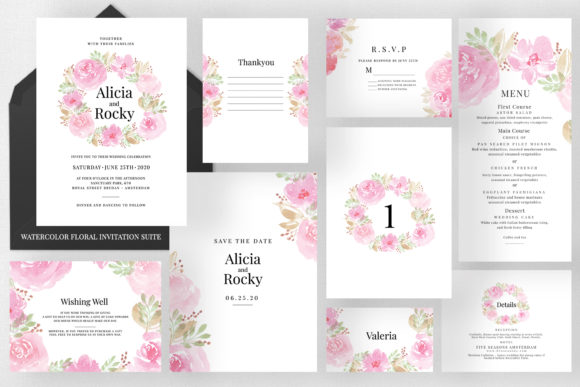
Planning a wedding involves countless decisions, but few set the tone quite like your stationery. The Pink Floral Sketch Wedding Suite offers a delicate, artistic solution for couples and designers seeking a cohesive visual identity. This collection is not merely a set of templates; it is a comprehensive design system built on hand-drawn botanical illustrations that evoke romance and elegance. Unlike generic digital downloads, this suite provides professional-grade Photoshop files that allow for deep customization while maintaining the integrity of the original artwork. Whether you are a bride managing your own stationery or a freelance designer fulfilling a client’s vision, understanding the practical application of these assets is essential for achieving a polished, print-ready result.
Understanding the Artistic Appeal and Versatility
The primary draw of this collection lies in its aesthetic balance. Floral sketches differ from watercolor paintings or vector art by offering a raw, organic texture that feels personal and timeless. The pink palette is versatile enough to complement various themes, from rustic garden parties to formal ballroom receptions. However, the true value extends beyond visuals. For DIY enthusiasts, this suite bridges the gap between amateur crafting and professional printing. The inclusion of nine distinct items ensures that every touchpoint of the guest experience matches perfectly. When guests receive a Save the Date that visually aligns with the table numbers and menus at the reception, it creates a subconscious sense of organization and care.
For creative professionals and small business owners in the stationery niche, this suite serves as a high-quality foundation. Instead of spending dozens of hours illustrating individual peonies or roses, designers can focus on typography and layout. The Smart Objects layers preserve the resolution of the floral elements regardless of how many times they are resized or repositioned. This efficiency allows freelancers to offer premium custom stationery packages at competitive price points without sacrificing quality or originality.
Comprehensive Breakdown of Included Assets
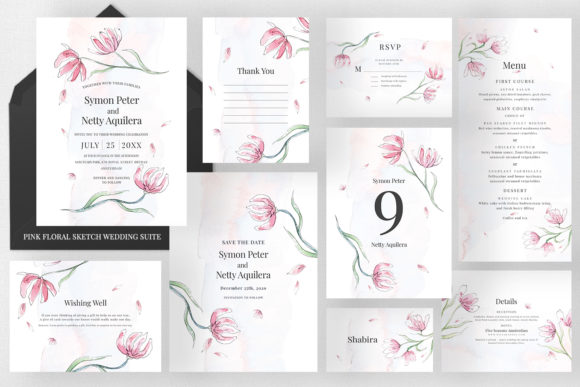
A common pitfall in purchasing wedding templates is discovering missing pieces after the fact. This suite addresses that frustration by providing a complete ecosystem of stationery. Understanding the specific dimensions and purposes of each file helps in planning your print run effectively.
- Invitation (US A7 - 5.25 x 7.25 inches): This is the centerpiece of the suite. The larger format accommodates detailed ceremony information and sets the initial impression. The extra height compared to standard cards allows for elegant vertical spacing.
- Save the Date (US A2 - 5.25 x 7.25 inches): Matching the invitation size, this card ensures early communication carries the same visual weight as the formal invite.
- Details Card (US A2 - 5.5 x 4.25 inches): Perfect for accommodation info, dress codes, or shuttle schedules. Its landscape orientation distinguishes it functionally from the main invitation.
- RSVP Card (US A2 - 5.5 x 4.25 inches): Sized to match the details card, creating a uniform stack when inserted into envelopes.
- Wishing Well Sign (US A1 - 4.875 x 3.5 inches): A smaller, discreet card often used for gift preferences or registry information, designed to be tucked inside the invitation suite without bulk.
- Thank You Card (US A1 - 3.5 x 4.875 inches): Post-wedding correspondence maintains the theme with a compact, portrait-oriented design.
- Table Numbers (US A7 - 5 x 7 inches): Tall enough to be visible across a dining table, ensuring guests find their seats easily.
- Place Cards (3.5 x 2 inches): Standard tent-card sizing that fits most place card holders and integrates seamlessly with table settings.
- Menu (4 x 9 inches): A slender, elongated format that sits elegantly atop napkins or chargers without overwhelming the tablescape.
Technical Specifications for Professional Results
Beautiful design fails if the technical execution is flawed. This suite is engineered for commercial printing standards, which requires attention to specific file attributes. Users must have Adobe Photoshop CS3 or later to access all features. While newer versions offer enhanced performance, CS3 compatibility ensures accessibility for those using older software.
Resolution is non-negotiable in print design. All files are set to 300 DPI (dots per inch) in CMYK color mode. RGB colors on screen often appear duller when printed; starting in CMYK ensures the pinks and greens render accurately on paper. Furthermore, each document includes a 0.25-inch bleed. This safety margin is critical. If your printer cuts slightly off-center, the bleed prevents unsightly white borders. When editing, keep vital text and floral elements within the safe zone, extending background colors or textures into the bleed area only if intended.
Leveraging Smart Objects for Non-Destructive Editing
The most powerful feature for beginners and pros alike is the Smart Objects layer system. Traditional raster editing degrades image quality every time you resize an element. Smart Objects act as protective containers. You can scale a floral sketch down for a place card and back up for an invitation without pixelation. Double-clicking the Smart Object thumbnail opens the source file, allowing you to adjust hue, saturation, or contrast globally across all instances where that flower appears. This consistency is what separates professional suites from disjointed DIY projects.
Practical Customization Strategies
Fully editable colors and text backgrounds mean you are not locked into the default pink scheme. Perhaps your wedding colors are dusty rose and sage green, or maybe navy and blush. Using Photoshop’s adjustment layers above the floral sketches allows you to shift tones without altering the original line work. This flexibility makes the suite reusable for different clients or seasons.
Typography selection plays a crucial role in balancing the sketchy florals. Because the illustrations have an organic, imperfect quality, pairing them with structured serif fonts or clean sans-serifs creates necessary contrast. Avoid overly distressed handwritten fonts that might compete with the sketch lines. Utilize the editable text backgrounds to create hierarchy; a subtle wash of color behind the date or names improves readability against busy floral areas.
Important Considerations Before You Begin
While this suite is user-friendly, realistic expectations prevent frustration. First, assess your Photoshop proficiency. If you have never used layers or masks, allocate time for basic tutorials before opening these files. The learning curve is manageable, but expecting instant mastery leads to errors. Second, verify your printer’s specifications before finalizing designs. Some online printers require PDF exports with specific bleed settings, while local shops may prefer packaged PSD files. Always request a physical proof to check color accuracy, as monitor calibration varies significantly.
Budgeting for paper stock is equally important. Floral sketches shine on textured papers like linen, cotton, or felt. Glossy finishes can make sketches look cheap or digital. The tactile experience of uncoated paper enhances the hand-drawn aesthetic. Finally, consider the timeline. Customizing nine items takes longer than anticipated. Create a production schedule that accounts for drafting, proofing, revisions, and shipping. Rushing the editing process often results in overlooked typos or alignment issues.
Ultimately, the Pink Floral Sketch Wedding Suite represents an intersection of artistry and utility. It empowers users to create bespoke stationery that feels professionally commissioned while retaining personal sentiment. By respecting the technical requirements and leveraging the comprehensive asset list, anyone from a novice planner to a seasoned graphic designer can produce a wedding identity that is both beautiful and functionally flawless.