Evaluating Floral Wedding Invitation Card Assets: Vector Scalability vs. Static Design
Selecting the right visual foundation for wedding stationery requires balancing aesthetic appeal with technical functionality. When researching options for a Floral Wedding Invitation Card, couples and designers often encounter two distinct categories of digital assets: rasterized templates and scalable vector objects. Understanding the distinction between these formats is essential for producing professional-grade invitations that remain crisp across various sizes, from save-the-date cards to large-format welcome signs. A vector-based floral asset offers specific advantages in customization and print quality that static images cannot match, though it also demands a different workflow and software access.
The Technical Distinction: Vector Objects vs. Raster Templates
Most pre-made invitation templates found on consumer marketplaces are raster files (JPEG, PNG, or PSD). These are pixel-based, meaning they have a fixed resolution. If a designer attempts to enlarge a rasterized Floral Wedding Invitation Card element beyond its original dimensions, the edges become blurry or pixelated. This limitation is problematic when adapting a design suite that includes both small response cards and large ceremony programs.
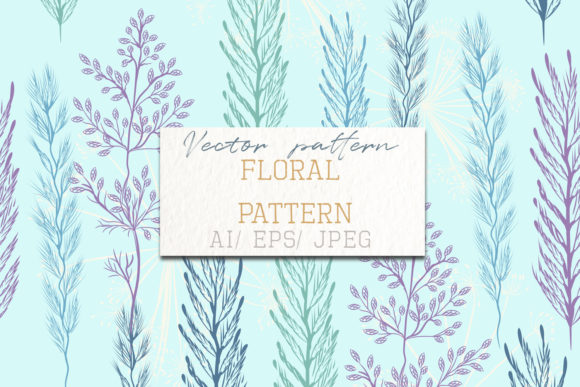
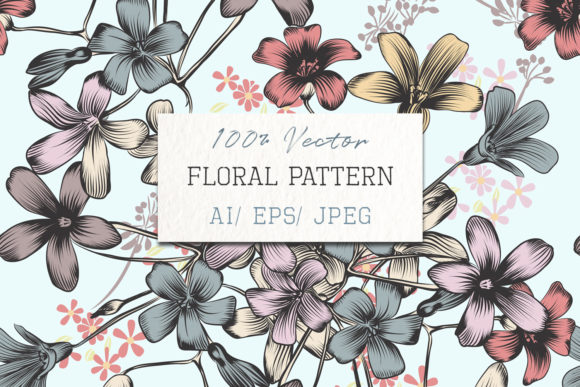
In contrast, a vector object is defined by mathematical paths rather than pixels. The specific asset described here—an EPS file featuring hand-drawn floral elements filled via the mesh tool—retains perfect clarity at any scale. Whether printed on a 5x7 inch invitation or scaled up for a 24x36 inch backdrop, the lines remain sharp. For users evaluating resources, this scalability is the primary decision factor. If the project requires size flexibility or high-resolution commercial printing, vector formats are superior. However, if the user lacks vector editing software or intends to use the design strictly at a predetermined size, a high-resolution raster template may be a more practical, albeit less flexible, alternative.
Aesthetic Authenticity: Hand-Drawn Mesh vs. Generated Art
Beyond file format, the artistic style of the floral element significantly impacts the tone of the invitation. Current market trends show a divergence between AI-generated florals, stock photography, and hand-drawn vector art. Each serves a different purpose in wedding design.
- AI-Generated Florals: Often visually complex but can lack logical botanical structure. They may appear generic or contain artifacts that look strange upon close inspection in print.
- Stock Photography: Offers realism but can feel impersonal or overly corporate. Integrating photos into a cohesive paper suite is often more challenging than integrating illustrated elements.
- Hand-Drawn Vector Art: The asset in question utilizes a bucket mesh tool to create color fills within hand-drawn lines. This technique preserves the organic imperfection of human illustration while allowing for digital color manipulation. It strikes a balance between bespoke artistry and editable utility.
For couples seeking a romantic, organic, or vintage aesthetic, hand-drawn vectors typically outperform generated alternatives. The "mesh tool" fill method allows for subtle gradients and shading that mimic watercolor or gouache, providing texture without the massive file sizes associated with high-res scanned paintings. When comparing options, evaluate whether the floral style aligns with the wedding's formality. Structured, geometric weddings may suit cleaner line art, while garden or bohemian themes benefit from the looser, hand-drawn style described here.
Customization Capabilities and Workflow Tradeoffs
The primary strength of a vector Floral Wedding Invitation Card asset is modifiability. Unlike a flattened JPEG where colors and shapes are permanent, an EPS file allows users to isolate individual elements. A designer can rotate a single bloom, recolor a leaf to match a specific Pantone swatch, or rearrange the composition to fit unique text placement. This level of control is vital for creating a cohesive brand identity across multiple stationery pieces.
However, this flexibility introduces a tradeoff: software dependency. To utilize this asset effectively, one must have access to vector editing programs such as Adobe Illustrator, Affinity Designer, or CorelDRAW. Users who only possess basic photo editors or word processing software will find the EPS format inaccessible. In such cases, the included JPEG file serves as a fallback, but it negates the scalability benefits. When evaluating this resource against others, consider your current toolkit. If you are hiring a professional designer, providing them with a vector asset saves billable hours compared to having them draw custom florals from scratch. If you are DIY-ing the invitations without vector skills, a fully assembled, editable template in Canva or Photoshop might be a more efficient choice despite lower technical quality.
Evaluating Fit: When to Choose Scalable Vector Assets
Determining whether this specific type of resource is the right investment depends on project scope and long-term needs. There are specific scenarios where a scalable, hand-drawn vector object is objectively the better option over static alternatives.
Ideal Use Cases
- Multi-Format Stationery Suites: If you need the same floral motif on business-card-sized place cards and large easel signs, vector is mandatory to maintain consistency.
- Color Matching Requirements: When wedding colors are specific (e.g., "Dusty Blue" or "Sage Green"), vector files allow exact color adjustments. Raster files often suffer from color banding or mismatched tones when edited.
- Professional Print Production: Commercial printers prefer vector art for line work and solid colors because it produces cleaner plates and sharper output than rasterized equivalents.
- Future Repurposing: Vector assets can be repurposed for thank-you notes, anniversary party invites, or even merchandise without quality loss, extending the value of the initial purchase.
When to Consider Alternatives
Conversely, there are situations where this asset type may not be the optimal fit. If the timeline is extremely tight and no vector editing knowledge exists, learning curve friction could delay production. Additionally, if the desired aesthetic is hyper-realistic photographic botany rather than illustrative art, a vector mesh fill will not achieve the intended look. Finally, for digital-only invitations viewed solely on screens, the resolution benefits of vector are negligible, and a well-designed raster template may offer faster implementation.
Licensing and Practical Implementation Considerations
When comparing digital assets, licensing terms are as critical as visual quality. The inclusion of a license file indicates clear usage rights, which protects against copyright infringement. Many free or low-cost floral clips lack transparent licensing, posing risks for commercial designers or couples planning to resell digital templates later. Always verify whether the license covers personal use, commercial end-products, or template creation.
Implementation also requires attention to file management. The package includes EPS, JPEG, and Help files. The EPS is the master source; the JPEG is a preview or fallback. Users should organize these files logically, keeping the master EPS safe and working on copies to preserve the original asset. The help file likely contains specific instructions regarding the mesh tool fills, which can sometimes behave unexpectedly in older software versions. Reading this documentation before beginning design work prevents frustration and ensures the asset performs as advertised.
Making an Informed Resource Decision
Ultimately, choosing a Floral Wedding Invitation Card resource is a calculation of value versus effort. A hand-drawn, scalable vector object represents a higher tier of design asset compared to standard clip art. It offers longevity, professional print readiness, and deep customization potential. These benefits come at the cost of requiring specialized software and skills.
For adults aged 20–50 navigating wedding planning or freelance design, the decision should hinge on the intended lifespan and quality requirement of the project. If the goal is a disposable, quick-fix solution, simpler alternatives exist. However, for those prioritizing print quality, aesthetic cohesion, and the ability to tailor every detail to a specific vision, investing in a properly constructed vector asset is a strategic choice. By understanding the technical and practical differences outlined above, you can select a resource that not only looks beautiful but also functions reliably throughout the entire design and production process.