Integrating the Floral Graduation Hat Cut File into Creative and Commercial Workflows
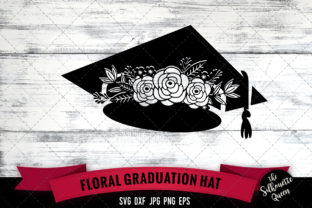
The transition from academic achievement to professional milestone is often marked by personalized celebration, and for creators, small business owners, and DIY enthusiasts, the Floral Graduation Hat Cut File serves as a foundational asset in that process. This digital resource is more than a simple decoration; it is a versatile production element that bridges the gap between digital design software and physical crafting machinery. Understanding how to leverage this specific asset requires looking beyond the aesthetic appeal of the flowers and focusing on file integrity, machine compatibility, and workflow efficiency. Whether you are producing custom graduation merchandise for an Etsy shop, creating personalized gifts for family members, or designing content for a blog, the successful implementation of this cut file depends on proper preparation and technical understanding.
Understanding File Formats and Machine Compatibility
A critical step in any cutting project occurs before the machine is even powered on. The value of a comprehensive Graduation Hat SVG file package lies in its multi-format inclusion, ensuring compatibility across different hardware ecosystems. Professional crafters and hobbyists alike must understand which file type corresponds to their specific workflow to avoid conversion errors or quality loss.
- SVG Files: These are the industry standard for Cricut Design Space and Silhouette Studio Designer Edition. Because they are vector-based, they allow for infinite scaling without pixelation. When working with a Craft SVG, the layers should remain separated, allowing you to change colors or hide specific floral elements without altering the base hat structure.
- DXF Files: Essential for users of the basic, free version of Silhouette Studio. Unlike SVGs, DXF files are line-based vectors that do not retain color information upon import. Users must manually assign cut lines and colors after opening the file, making organization during the pre-production phase vital.
- EPS Files: Primarily intended for professional designers using Adobe Illustrator, CorelDRAW, or Inkscape. If your workflow involves modifying the Floral Graduation Hat Cut File to create a new derivative design or combining it with other vector assets, EPS provides the most robust editing environment.
- PNG and JPG Files: While not used for cutting vinyl or cardstock directly, these raster images at 300dpi serve crucial support roles. The transparent PNG is ideal for print-then-cut projects, sublimation transfers, or digital mockups. The white-background JPG is optimized for web listings, social media promotion, or archival reference.
Selecting the correct format prevents common friction points such as jagged edges, disconnected nodes, or sizing discrepancies. For those managing a production schedule, verifying file integrity immediately upon download ensures that manufacturing time is not wasted on troubleshooting incompatible assets.
Pre-Production Planning and Asset Organization
Efficiency in crafting and small business operations stems from organized digital asset management. Before importing the Graduation Hat with Flowers design into your cutting software, establish a consistent filing system. Because this download includes five distinct file types, keeping them grouped within a dedicated project folder prevents version confusion. Many professionals rename files to include project specifics, such as "ClassOf2024_FloralHat_SVG," to streamline future retrieval.
During the planning phase, consider the material constraints relative to the design complexity. A detailed Cute Cut File featuring intricate floral petals may require adjustments based on the substrate. Cutting adhesive vinyl requires different blade settings and weeding considerations than cutting cardstock or heat transfer vinyl (HTV). Reviewing the design’s node count and smallest detail size before committing to a cut saves both material and time. If the design is too intricate for your chosen material, use the EPS or SVG file in editing software to simplify paths or weld overlapping elements. This proactive adjustment is a hallmark of experienced production workflows.
Execution Strategies for Cutting and Assembly
Once the file is imported and materials are selected, the execution phase begins. The Cutting File Silhouette Cricut compatibility means the design has been tested for clean cuts, but user settings dictate the final outcome. For multi-layered floral designs, registration marks or alignment guides are often necessary. If the provided SVG does not include built-in alignment layers, creating manual registration boxes in your software ensures that each color layer stacks perfectly.
When working with the Floral Graduation Hat Cut File for apparel, remember to mirror the design if using HTV. This is a frequent oversight that ruins otherwise perfect cuts. Additionally, test cuts are non-negotiable in professional workflows. Blade sharpness, mat stickiness, and material batch variations can all affect performance. A small test square containing the thinnest floral stem from the design allows you to dial in pressure and speed settings without wasting a full sheet of premium vinyl.
For those utilizing the included 300dpi PNG for print-then-cut applications, ensure your printer settings match the paper type. High-resolution files demand high-quality print modes to prevent banding or color shifts. After printing, allow ink to dry completely before applying laminate or running through the cutter to avoid smearing. The precision of the cut line relies heavily on accurate scanner calibration; if your machine struggles to read registration marks, adjust lighting conditions or apply matte tape over glossy areas to reduce glare.
Commercial Application and Product Development
For entrepreneurs and marketers, the Graduation Hat SVG file represents inventory potential. Integrating this asset into a product line requires understanding licensing and market differentiation. While the base file is a starting point, successful sellers often modify the design to create unique offerings. Adding custom text, changing flower varieties, or adjusting the hat shape transforms a generic Cute Cut File into proprietary merchandise. This customization not only adds value but also helps avoid saturation in competitive marketplaces.
Mockup creation is another area where the included raster files excel. Before producing physical inventory, use the transparent PNG to create realistic digital mockups for product listings. This reduces upfront risk and allows for A/B testing of different colorways or placement options. High-quality visuals derived from the 300dpi source files build consumer trust and accurately represent the final product. When listing items, clearly communicate the dimensions and materials used, as the digital perfection of a Craft SVG can sometimes mislead customers regarding real-world texture and scale.
Post-Project Archiving and Iteration
The workflow does not end when the project is complete. Documenting settings, material combinations, and modifications made to the Floral Graduation Hat Cut File creates a knowledge base for future seasons. Graduation trends evolve annually; having notes on which floral styles performed best or which vinyl brands yielded the cleanest weeds informs next year’s purchasing and design decisions.
Proper archiving also involves backing up original source files. Cloud storage or external drives protect against data loss, ensuring that the Cutting File Silhouette Cricut assets remain accessible for reorders or portfolio updates. If you modified the original SVG or EPS, save both the edited version and the untouched master copy. This preserves flexibility, allowing you to return to the baseline design if future projects require different adaptations.
Troubleshooting Common Integration Issues
Even with high-quality files, technical hiccups occur. Understanding how to resolve them maintains workflow momentum. If the Graduation Hat with Flowers appears as a solid black silhouette in Silhouette Studio, verify that you opened the SVG rather than the DXF, or check that the file was not corrupted during extraction. Zipped files must be fully extracted before use; attempting to open them directly from a compressed folder frequently causes missing layers or import failures.
Sizing discrepancies are another common issue. Some software imports SVGs at a default canvas size rather than the designer’s intended dimensions. Always check the measurement panel immediately after import. Resizing after ungrouping can distort proportions; resize the entire grouped design first, then ungroup for color separation. For the 300dpi PNG, ensure your document DPI matches the image resolution when placing it in design software to maintain crisp edges. Low-resolution displays can make images appear blurry on screen even when the file itself is high quality; zoom to 100% to verify actual clarity.
Weeding difficulties often stem from overly complex paths in a Cute Cut File. If floral details are tearing, consider using a weeding box to stabilize the surrounding material or switching to a premium vinyl with stronger adhesive backing. Sometimes, slowing the cutting speed improves accuracy on intricate curves more effectively than adjusting blade depth. These micro-adjustments, informed by experience and observation, distinguish professional results from amateur attempts.
Maximizing Value Across Platforms
The versatility of this file package extends beyond traditional cutting machines. Educators and bloggers can use the EPS or PNG files to create cohesive branding for graduation-themed content, worksheets, or presentation slides. Marketers might incorporate the floral motif into email headers or social media templates, maintaining visual consistency across channels. The key is treating the Floral Graduation Hat Cut File as a modular design system rather than a single-use graphic.
Collaboration also benefits from standardized formats. If working with a team or outsourcing production, providing the appropriate file type for each collaborator’s software eliminates conversion bottlenecks. A printer needs high-res PNGs; a cutter needs SVGs; a designer needs EPS. Distributing the correct assets upfront streamlines communication and reduces revision cycles. This systematic approach to digital asset utilization transforms a simple purchase into a scalable component of your creative or business infrastructure.
Ultimately, successful integration of the Graduation Hat SVG file hinges on respecting both the technical specifications and the creative possibilities. By approaching the file with a process-oriented mindset—focusing on compatibility, preparation, execution, and documentation—you ensure that this asset delivers consistent value across multiple projects and platforms. Whether crafting a single sentimental gift or fulfilling hundreds of commercial orders, the principles of efficient workflow remain the same: plan thoroughly, execute precisely, and iterate continuously.