Floral Deer: A Versatile Design Asset for Modern Crafting and Branding
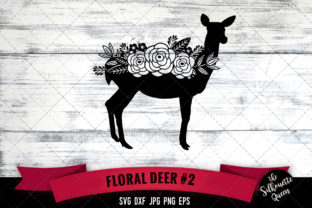
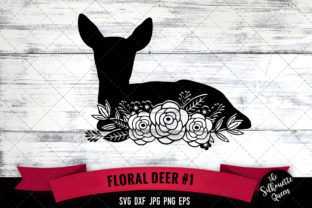
The intersection of woodland aesthetics and botanical elegance has created a lasting trend in both digital design and physical crafting. The Floral Deer SVG file represents more than just a cute animal illustration; it serves as a functional bridge between rustic charm and refined femininity. For creators, small business owners, and hobbyists, this specific design asset offers immediate utility across multiple platforms. Whether you are operating a Cricut or Silhouette cutter for custom apparel or designing digital stationery for an upcoming event, the combination of a graceful deer silhouette intertwined with delicate flowers provides a visual shorthand for nature, gentleness, and organic beauty.
Understanding the practical value of this design requires looking beyond the image itself. It is about how the included file formats translate into real-world projects. When you download a package containing SVG, EPS, DXF, PNG, and JPG files, you are acquiring a toolkit rather than a single picture. Each format solves a specific technical problem that arises during the creative process, ensuring that the design remains crisp whether it is printed on a 5x7 invitation card or cut from vinyl for a large window decal.
Technical Versatility Across Cutting Machines and Print Media
The primary reason crafters seek out specific cutting files like Floral Deer is compatibility. Different machines and software interpret vector data differently. The inclusion of an SVG file is essential for users of Cricut Design Space and Silhouette Studio Designer Edition. This scalable vector format allows you to resize the deer and flower elements infinitely without losing edge quality. More importantly, SVGs maintain separate layers for different colors. If the deer is brown and the flowers are pink and green, a properly formatted SVG keeps these elements distinct, allowing your machine to execute multi-color cuts or print-then-cut projects without manual tracing or reassembly.
For those using older versions of Silhouette Studio or other cutting software that may not support SVG natively, the DXF file acts as a critical backup. DXF is a universal CAD format that preserves line work for cutting. While it sometimes lacks the color layering of an SVG, it ensures that users with basic software can still access the cut lines. This inclusivity prevents frustration for beginners who have not yet upgraded their software but still want to produce professional-looking vinyl decals or iron-on transfers.
On the printing side, resolution dictates quality. The package includes a PNG file with a transparent background at 300dpi. This specification is non-negotiable for sublimation printing and digital design. If you are creating a tumbler wrap or a mug design, the transparent background allows the floral deer to sit seamlessly over colored backgrounds or textured patterns without a white box ruining the aesthetic. The 300dpi resolution ensures that inkjet printers lay down enough dots per inch to create smooth gradients and sharp petal details. Conversely, the JPG file with a white background serves traditional print needs. It is ideal for inserting directly into word processing documents, basic photo editors, or office printers where transparency support is limited or unnecessary.
Commercial Applications for Small Business Owners
Entrepreneurs in the personalized gift market often face the challenge of finding designs that appeal to broad demographics while feeling unique. The Floral Deer motif hits a sweet spot for several profitable niches. Consider the baby and maternity sector. This design is frequently used for nursery wall art, onesies for baby showers, and milestone blankets. The softness of the floral elements makes it appropriate for gender-neutral or feminine themes without being overly cartoonish. Because the EPS file is included, graphic designers can open the artwork in Adobe Illustrator or CorelDRAW to modify colors, add a family name in a complementary font, or adjust the composition to fit specific merchandise templates.
Seasonal retail also benefits significantly from this asset. During autumn and winter, the woodland theme aligns perfectly with holiday markets. However, the addition of flowers prevents the design from feeling exclusively wintery, extending its shelf life into spring and summer. A vendor selling at a craft fair in April can use the same Floral Deer design for Easter baskets or Mother’s Day cards simply by changing the vinyl color palette from deep reds to pastels. This versatility maximizes the return on investment for the digital file, as it does not expire with a single season.
Educational and Personal Creative Projects
Beyond commerce, educators and homeschoolers utilize nature-themed graphics to create engaging learning materials. A Floral Deer can serve as a mascot for a forest school curriculum or a decorative element on science worksheets about local wildlife and botany. The clean lines of the SVG make it easy to convert into coloring pages for younger students, while the high-resolution PNG works well for laminated flashcards or classroom posters. In these settings, the design adds warmth to educational content, making learning environments feel more inviting and less sterile.
For personal hobbyists, the application is often driven by sentiment. Scrapbookers preserving memories of outdoor adventures or family trips to national parks find that this design captures the mood better than generic clip art. Journalers using digital planning apps can import the transparent PNG to decorate monthly spreads without obscuring underlying grid lines. The emotional resonance of the image—evoking tranquility and connection to nature—is what transforms a simple craft project into a meaningful keepsake.
Strategic Considerations Before Downloading and Using
While the Floral Deer design is versatile, successful implementation depends on understanding your specific workflow. Before incorporating this asset into your library, evaluate your current hardware and software ecosystem. If you primarily use a Silhouette Cameo with the basic (free) version of Silhouette Studio, you must rely on the DXF file. Be aware that DXF imports can sometimes result in disconnected nodes or lost grouping. You may need to spend extra time regrouping elements before cutting. Users in this situation should test the DXF file on scrap material first to ensure the cut paths are continuous.
Licensing is another critical factor that separates hobbyist use from commercial application. Always verify the terms associated with the specific Floral Deer file you acquire. Some licenses permit unlimited physical product sales but restrict digital redistribution or mass production. If you plan to sell t-shirts featuring this deer on Etsy or Amazon Merch, confirm that the license covers third-party platform sales. Understanding these boundaries protects your business from intellectual property disputes and ensures ethical usage of the artist's work.
Consider the complexity of the design relative to your chosen medium. Intricate floral details within the deer silhouette look stunning on paper and in high-resolution prints, but they can be challenging when cut from adhesive vinyl. Thin stems and small petals may tear during weeding or fail to adhere to textured surfaces. If you intend to cut this design from vinyl, consider using a premium permanent vinyl or heat transfer vinyl designed for detail. Alternatively, use the "weld" function in your cutting software to merge tiny overlapping areas, creating a stronger single piece that is easier to weed and apply. For iron-on projects, mirroring the SVG before cutting is mandatory, a step that is easily overlooked when rushing through production.
Optimizing Design Outcomes Through Format Selection
The decision of which file to use should always be dictated by the end goal rather than habit. Many users default to SVG because it is the industry standard for cutting, but this isn't always optimal. If you are designing a web banner or a social media post promoting a nature retreat, the PNG is superior because it loads faster and integrates easily with web builders. If you are sending a design to a professional screen printer or sign shop, they will likely request the EPS or AI-compatible vector file to ensure their RIP software processes the curves correctly. Sending a JPG to a professional printer often results in pixelated edges and color banding, undermining the quality of the final product.
Color management also varies by format. The RGB color space used in PNG and JPG files is optimized for screens, while CMYK is required for professional offset printing. While the provided files are likely in RGB, professional users should convert the EPS file to CMYK in Illustrator before sending it to a print shop to avoid unexpected color shifts, particularly with greens and browns common in floral deer illustrations. Home crafters using inkjet printers generally do not need to worry about this conversion, as consumer printers handle RGB-to-CMYK translation internally, but being aware of the distinction helps troubleshoot color mismatches.
Ultimately, the Floral Deer SVG and accompanying files represent a foundational resource for anyone working at the intersection of nature-inspired art and modern fabrication. Its value lies not just in the aesthetic appeal of the illustration, but in the comprehensive suite of formats that empower users to execute their vision regardless of technical constraints. By matching the right file type to the specific project requirements—from transparent PNGs for sublimation to layered SVGs for multi-color vinyl cuts—creators can ensure that every application of this design achieves professional, polished results. Whether building a brand identity, teaching a class, or crafting a personal gift, this asset provides the flexibility needed to bring woodland elegance to life in tangible, meaningful ways.