Floral Blow Dryer: A Creative Design for Crafters and Digital Artists
The Floral Blow Dryer design is more than just a charming visual—it’s a versatile digital asset that opens up creative possibilities for crafters, designers, and small business owners. Whether you're working on a custom t-shirt, a personalized mug, or a digital illustration, this design brings a unique blend of beauty and function to your projects. The package includes a range of file types—SVG, EPS, DXF, PNG, and JPG—making it compatible with popular design and cutting software like Cricut, Silhouette, Adobe Illustrator, and Inkscape.
Understanding the Design and Its Uses
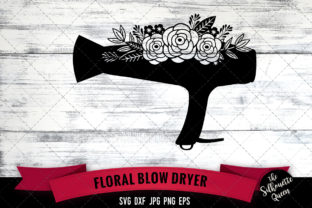
The Floral Blow Dryer design features a realistic blow dryer shape intertwined with floral patterns, giving it a soft, elegant aesthetic. This makes it especially appealing for those in the beauty, wellness, or lifestyle niches. The design can be used for:
- Cricut and Silhouette crafting projects
- Print-on-demand products like t-shirts, mugs, and tote bags
- Graphic design work in Adobe or Canva
- Social media visuals and blog graphics
Common Mistakes When Using the Floral Blow Dryer Files
Even with high-quality files, users often run into issues that affect the final output of their project. Here are some common mistakes and how to avoid them:
Mistake 1: Using the Wrong File Type for Your Software
Each file format serves a specific purpose. For example, using a JPG file in a cutting machine like Cricut won’t work because it lacks vector data. Similarly, using an SVG file in a program that doesn’t support vector graphics can lead to poor resolution or distortion.
Better approach: Always match the file type to your software. Use SVG for Cricut and Silhouette machines, PNG for high-quality images with transparent backgrounds, and JPG for general use where background transparency isn’t needed.
Mistake 2: Ignoring File Resolution and DPI
While all the files included in the Floral Blow Dryer package are 300dpi, some users may resize images beyond their recommended dimensions, leading to pixelation or blurriness—especially with raster formats like JPG and PNG.
Better approach: Stick to the original size or scale vector files (SVG, DXF, EPS) instead of raster images when possible. Vector files maintain clarity at any size, making them ideal for both small crafts and large-format prints.
Mistake 3: Overlooking File Compatibility
Not all design programs handle every file type equally. Some versions of Silhouette Studio, for example, can’t open SVG files without an upgrade. Similarly, older versions of Adobe Illustrator may struggle with newer EPS formats.
Better approach: Check your software version before downloading or importing files. If you're using a free version of Silhouette Studio, opt for the DXF format instead of SVG. For Adobe users, ensure your Illustrator version supports the EPS file included.
Mistake 4: Not Previewing Before Cutting or Printing
Jumping straight into cutting or printing without previewing the layout can result in misalignment, incorrect sizing, or even wasted materials.
Better approach: Use the preview function in your design software to check positioning, scale, and layering. This is especially important when working with layered SVG files or combining multiple elements in a single design.
What to Check Before Downloading or Using Floral Blow Dryer Files
To ensure smooth and successful use of the Floral Blow Dryer design, consider the following factors before you begin your project:
- Software Compatibility: Confirm that your design or cutting software supports the file type you plan to use.
- File Integrity: Make sure all layers and paths are properly grouped and outlined, especially in vector files like SVG and EPS.
- License and Usage Rights: Always check if the design is for personal use, commercial use, or if attribution is required.
- Color and Transparency: If you're using the PNG file, verify that the transparent background displays correctly in your design environment.
Maximizing the Value of Your Floral Blow Dryer Design
When used correctly, the Floral Blow Dryer design can elevate your creative or business projects. Here are some practical tips to get the most out of it:
- Customize the colors: Use the vector files to recolor the design to match your brand or product palette.
- Combine with other elements: Layer the design with text, borders, or other graphics to create a more dynamic visual.
- Test with materials: Especially for crafters, test the design on different materials (e.g., vinyl, cardstock, HTV) to see how it performs in real-world applications.
Conclusion: A Thoughtful Approach to Design Use
The Floral Blow Dryer design is a beautiful and functional asset, but like any creative tool, its success depends on how it’s used. By avoiding common file format mistakes, understanding software limitations, and planning your project carefully, you’ll ensure high-quality results every time. Whether you're a hobbyist, small business owner, or digital creator, taking the time to use the right files the right way will save you time, reduce frustration, and improve your final output.